
The Premium Home Office Setup Process: 2026 Guide

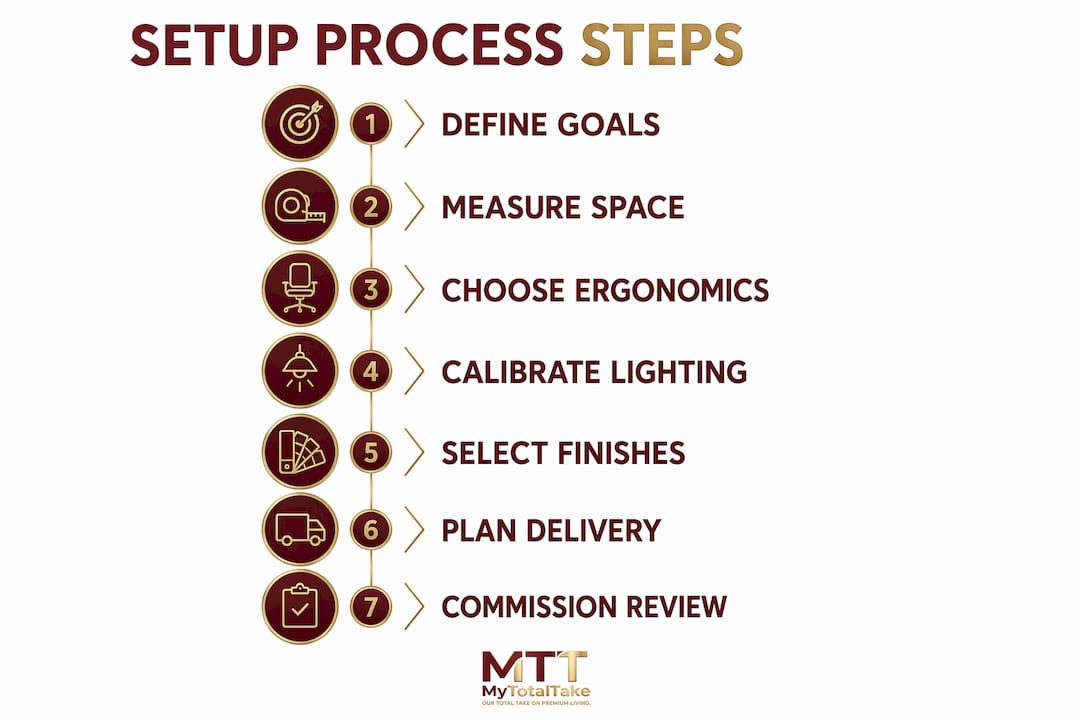
The premium home office setup process is a five-step, 4–8 week plan that moves you from a blank brief to a finished, broadcast-ready executive workspace. The steps are: Plan → Measure & Zone → Ergonomics & Core Furniture → Environment & Tech → Commission. At the end of that timeline you will have white-glove installation complete, cables invisible, lighting calibrated, and a 30-day review scheduled to fine-tune the result.
What you get at the end of the process:
- A fully zoned workspace with distinct work, conversation, and display areas
- Ergonomic placement confirmed against published specifications
- Invisible cable routing and a reliable power backbone
- Layered lighting calibrated for both focus and video presence
- A 30-day commissioning review to protect the investment
Table of Contents
- Step 1: How do you define goals and budget for a premium office?
- Step 2: How do you measure and zone a premium home office?
- Step 3: What ergonomic specs should you use for desk and chair selection?
- Step 4: How do you calibrate lighting and acoustics for a premium workspace?
- Step 4b: What technology and cable management does a premium office require?
- Step 5: What materials and finishes define quiet luxury in a home office?
- How do you plan sourcing, delivery, and installation for a premium office?
- What should you test and adjust during the 30-day commissioning review?
- Key Takeaways
- A curator’s perspective on building quiet-luxury home offices
- Mytotaltake makes this process easier to execute
- Useful sources and further reading
Step 1: How do you define goals and budget for a premium office?
Before you source a single piece, lock down a written brief. The brief is what separates a coherent executive space from an expensive collection of mismatched furniture.
Match use cases to required features:
- Deep work requires acoustic separation, tunable lighting, and a large primary display
- Video meetings demand a curated camera corner, controlled background, and broadcast-quality audio
- Client entertaining calls for a conversational seating zone and display shelving
- Hybrid studio adds acoustic panels, a dedicated mic arm, and a secondary screen for monitoring
Three premium budget tiers:
| Tier | Approximate Investment | What It Buys |
|---|---|---|
| Curated Premium | $5,000–8,000 | Top-tier ergonomic chair, quality standing desk, ultrawide display, layered lighting, cable management |
| Bespoke Build | $8,000–15,000 | Custom millwork, premium leather chair, motorized sit-stand, acoustic treatment, integrated AV |
| Fully Custom | — | Architect-designed zoning, bespoke cabinetry, full smart-home integration, white-glove project management |
Premium desk and chair pieces can last many years, with typical lifespans longer than monitors and peripherals. That lifespan math strongly favors allocating the largest share of the budget to the items that touch your body first.
Decision checklist before sourcing:
- Camera corner requirement confirmed (yes/no)
- Room acoustics target (ambient noise level for video calls)
- Desired material palette (timber species, leather grade, metal finish)
- Sustainability and provenance requirements
Pro Tip: Include warranty terms and white-glove installation in the brief before you contact any vendor. Suppliers price accordingly, and you avoid discovering that “delivery” means curbside drop-off after you have already committed.
Step 2: How do you measure and zone a premium home office?
Zoning is the move that separates an executive space from a home desk. Interior architects treat the premium office as an architectural project: scale and proportion create the executive feel, not just expensive furniture.
Room measurement checklist:
- Ceiling height (affects pendant lighting and tall shelving scale)
- Door swing radius and clearance path
- Window placement and orientation (natural light direction, glare risk)
- Electrical outlet and data port locations
- HVAC register positions (avoid placing the desk directly in the airflow)
- Minimum desk clearance: 48 inches behind the chair for standing and circulation
- Standing desk footprint at full extension
Three functional zones:
- Primary work zone: Centered on the desk, monitor, and task lighting. This zone demands the most acoustic and lighting control.
- Conversational seating zone: Two chairs or a small sofa at a 90-degree angle to the desk. Keeps client meetings from feeling transactional.
- Display/library zone: Shelving, art, or a media wall. This is also your camera background.
The camera corner is the most critical architectural element in a modern home office. Evaluate it from your seated eye height before finalizing furniture placement. The wall behind you is what every video call participant sees first — treat it as the prime display zone and eliminate all cable visibility from that sightline.
Pro Tip: Photograph the camera corner from your seated position before finalizing any shelving or art placement. What looks tidy in person often reads as cluttered at 1080p.

Step 3: What ergonomic specs should you use for desk and chair selection?
Get the measurements right before you spend on materials. The published ergonomic standards are specific: monitor distance 20–26 inches (arm’s length), top edge at or slightly below eye level, desk at elbow height so forearms stay horizontal, elbows at roughly 90 degrees. These numbers are not suggestions. Deviating from them over an eight-hour day produces the musculoskeletal strain that premium furniture is supposed to prevent.
Desk selection checklist:
- Sit-stand range: 29–48 inches covers most users
- Integrated cable routing (grommets, spine channel, or underdesk tray)
- Surface depth of at least 30 inches to achieve proper monitor distance
- Finish: matte over gloss to reduce reflective glare
Chair selection criteria:
- Seat height, depth, and tilt all independently adjustable
- Lumbar support positioned at the natural curve of the lower back
- Armrests at elbow height, not pushing shoulders upward
- Tactile materials: full-grain leather or high-grade mesh, not synthetic plastic shells
Ergonomic specification table:
| Measurement | Target Range | Notes |
|---|---|---|
| Monitor distance | 20–26 in | Arm’s length from seated position |
| Monitor top edge | At or below eye level | Neutral neck posture |
| Desk height | Elbow height when seated | Forearms horizontal |
| Elbow angle | ~90° | Wrists neutral, not bent |
| Sit-stand desk range | 29–48 in | Covers 5’2"–6’4" users |
| Chair seat depth clearance | 2–3 fingers behind knee | Prevents circulation restriction |
A 38-inch 3840×1600 ultrawide display provides more horizontal workspace than dual 1440p monitors and reduces cable count. Dual 4K remains the right call only when two independent full-screen applications are genuinely essential.
The ergonomic investment in a quality chair and desk pays for itself in avoided discomfort over many years. Buy the chair and desk as a matched pair to preserve scale and executive presence — an underscaled desk paired with a commanding chair undermines the entire room.
Pro Tip: Order the chair first. Sit in it at your current desk for one week before the new desk arrives. You will know exactly what height and armrest position to specify.
Step 4: How do you calibrate lighting and acoustics for a premium workspace?
Workspace variables including temperature, light spectrum, visual complexity, and acoustic profile are among the most controllable factors that influence cognitive performance. Address them before sourcing decorative elements.
Layered lighting plan:
- Ambient: Warm overhead at 3000K for morning and evening; tunable to 5000–6500K for deep-focus afternoon sessions
- Task: Adjustable arm lamp positioned to eliminate shadow on the work surface
- Bias: LED strip behind the monitor, targeting a screen-to-wall contrast ratio of 3:1 or less, set to 6500K during daylight hours and 3000K at night
Room temperature held at 70–72°F supports sustained cognitive performance. That range is narrow enough to justify a dedicated mini-split or smart thermostat for the office rather than relying on whole-house HVAC.
Acoustic measures:
- Place absorption panels (fabric-wrapped acoustic foam or bespoke upholstered panels) on the wall opposite the primary reflection point
- Use diffusion on the rear wall to preserve some liveliness without flutter echo
- Upgrade the door to a solid-core model with a door sweep for meaningful sound isolation. A quality interior door upgrade is one of the most cost-effective acoustic improvements available
- Target ambient noise below 40 dB for video calls and below 35 dB for deep focus
Pro Tip: Test your bias lighting color temperature on camera before finalizing the installation. Some LED strips render skin tones green or orange at 6500K. Confirm the result looks natural on your actual webcam before committing to the mount position.
Step 4b: What technology and cable management does a premium office require?
The invisible office aesthetic depends entirely on treating cable management as an architectural task, not an afterthought. Budget 2–3 hours specifically for routing cables during installation.
Technology backbone checklist:
- Thunderbolt 4 or USB-C dock with at least 4 USB-A ports, 2 USB-C, and dedicated Ethernet passthrough
- UPS sized to your monitor and dock load (minimum 600VA for a single-display station)
- Wired Cat 6 Ethernet from router to desk; Wi-Fi as backup only
- VLAN separation for smart-home devices to keep them off the primary work network
- Dedicated circuit or surge-protected power distribution unit in an underdesk or in-cabinet enclosure
Monitor configuration comparison:
| Configuration | Best For | Cable Count | Notes |
|---|---|---|---|
| 38" ultrawide (3840×1600) | Most hybrid professionals | 1–2 | Fewer cables, seamless workspace |
| Dual 4K | Two independent full-screen apps | 3–5 | More cable management required |
Route cables: desk grommets → cable spine along the desk leg → floor-level power distribution box. That three-stage route keeps every surface clear and every cable invisible from the camera corner.
Pro Tip: Centralize all power distribution in an underfloor or in-cabinet power box. A single clean power run to the desk, rather than multiple bricks and strips, is what makes the ‘invisible office’ achievable rather than aspirational.
Step 5: What materials and finishes define quiet luxury in a home office?
The 2026 “Invisible Office” and “Tactile Wealth” trends move decisively away from glossy branded tech toward matte composites, heritage timbers, and natural leather. The goal is a restorative environment, not a tech showroom.
Material and finish selection checklist:
- Desk surface: Solid hardwood (white oak, walnut, or ebony) or matte lacquer over MDF with solid wood edging
- Chair upholstery: Full-grain leather or premium vegan leather in matte finish; avoid mesh in a client-facing space
- Hardware: Brushed brass, matte black, or aged bronze; never mix more than two metal finishes in one room
- Rug: Natural fiber (wool, jute, or silk blend) sized to anchor the primary work zone
- Art and display: One large-format piece over the display zone rather than a gallery wall of small frames
When contracting makers, request provenance documentation: species certification for solid wood, tannery origin for leather, and artisan credentials for bespoke pieces. Understanding what defines luxury materials before you sign a purchase order protects you from premium-priced commodity goods.
Pro Tip: Buy the desk and chair as a coherent set from a single maker or collection. Mismatched scales and finishes are the most common reason a well-budgeted office fails to read as executive.
How do you plan sourcing, delivery, and installation for a premium office?
A vendor brief that omits delivery terms is incomplete. Confirm finish samples, shipping windows, white-glove installation scope, warranty duration, and return policy in writing before placing any order.
Sample 6-week procurement schedule:
| Week | Milestone |
|---|---|
| 1 | Finalize brief, confirm measurements, place long-lead orders (custom desk, chair, cabinetry) |
| 2 | Electrical and network rough-in; confirm UPS and dock specifications |
| 3 | Acoustic panel fabrication; order lighting fixtures and monitor arm |
| 4 | Furniture delivery and white-glove installation; cable routing (allow 2–3 hours) |
| 5 | Lighting calibration, bias lighting install, art and rug placement |
| 6 | Commissioning, ergonomic measurement confirmation, 30-day review scheduled |
White-glove delivery checklist:
- Confirm the delivery team will unpack, position, and remove all packaging
- Verify installation scope includes wall mounting, cable routing, and ergonomic adjustment
- Photograph all pieces on delivery for warranty records
- Confirm the return window in writing before the team leaves
Pro Tip: Place long-lead custom orders in Week 1 even if the room is not ready. Custom furniture typically requires 4–8 weeks of fabrication. Ordering late is the single most common cause of project delays.
What should you test and adjust during the 30-day commissioning review?
Commissioning is the step most buyers skip. It is also where the investment either pays off or quietly underperforms.
Measurement checklist at handover:
- Confirm monitor distance: measure from eye to screen surface (target: 20–26 in)
- Confirm monitor top edge is at or below seated eye level
- Confirm desk height matches elbow height when seated
- Confirm chair seat depth: 2–3 fingers of clearance behind the knee
- Confirm lumbar support aligns with the natural curve of the lower back
Functional technology checks:
- UPS failover test: disconnect mains power and confirm the system holds for at least 5 minutes
- Dock connectivity: confirm all ports active and single-cable connection to laptop confirmed
- Camera framing: confirm camera corner is clean, background is curated, and lighting renders skin tones accurately
- Wired network throughput: run a speed test on the Ethernet connection and confirm it meets your ISP’s rated speed
30-day review plan:
- Keep a brief daily log of any discomfort (neck, wrist, lower back, eye strain)
- At day 14, revisit monitor height and chair lumbar position
- At day 30, confirm all warranty registrations are complete and initiate any returns within the window
- Schedule a final ergonomic check against the published specifications before closing the project
Key Takeaways
A premium home office setup process succeeds or fails on three decisions: ergonomic precision, invisible cable routing, and material coherence across every surface.
| Point | Details |
|---|---|
| Ergonomics first | Set monitor at 20–26 in distance, top edge at eye level, desk at elbow height before finalizing any other element. |
| Cable invisibility | Route cables through grommets, a spine, and a floor power box; budget 2–3 hours for this during installation. |
| Material coherence | Buy desk and chair as a matched set; limit metal finishes to two and prioritize matte, natural surfaces. |
| 30-day review | Log discomfort daily, revisit chair and monitor settings at day 14, and confirm all warranties at day 30. |
| Mytotaltake | Mytotaltake offers curated luxury furniture and decor with white-glove delivery and free returns to support every stage of this process. |
A curator’s perspective on building quiet-luxury home offices
The mistake most buyers make is treating this as a shopping project rather than an architectural one. They source the chair from one brand, the desk from another, and the lighting from a third — and then wonder why the room feels like a showroom floor rather than a private study.
The offices that genuinely work, the ones that feel like they belong in an architectural digest rather than a tech review, are the ones where someone made a brief first. They decided what the room was for before they decided what went in it. Zoning is not a design luxury; it is the mechanism that makes a room feel intentional at executive scale.
The other thing worth saying plainly: the ergonomic specifications are not negotiable. The numbers exist because decades of occupational health research produced them. A beautiful desk at the wrong height is still a desk that will cost you in discomfort over time. Get the measurements right, then choose the materials.
Mytotaltake makes this process easier to execute
Sourcing a premium office independently means managing multiple vendors, coordinating delivery windows, and chasing warranty documentation across five or six suppliers. That is a project management burden most buyers underestimate until they are mid-process.

Mytotaltake curates luxury furniture that earns its place in a premium workspace, with white-glove delivery, free returns, and warranty support built into every order. The collections are selected for craftsmanship, material provenance, and scale coherence — the three qualities that determine whether a room reads as quietly luxurious or merely expensive. Rather than coordinating five separate vendors, you work from a single curated source with consolidated shipping and a consistent standard of finish. Browse the curated collections at Mytotaltake and request a custom plan matched to your brief and timeline.
Useful sources and further reading
The specifications and design frameworks in this guide draw from the following primary sources. Use them to verify measurements, validate material choices, and go deeper on any single topic.
- Ergonomic specifications (monitor distance, desk height, chair setup): Neurosity — Best Desk Setups for Remote Knowledge Workers
- Zoning and scale principles: Build-Construct — Luxury Home Office Design Ideas
- Cable management and premium gear guidance: DeskDNA — Premium Home Office Setup
- 2026 Invisible Office and Tactile Wealth trends: Sunaofe — 2026 Quiet Luxury Home Office Design
- Executive styling and desk/chair pairing: Home Tunez — Luxury Home Office Design
How to use these sources: Cross-reference the Neurosity ergonomic numbers against your own measurements during commissioning. Use the DeskDNA premium setup guide as a gear checklist when finalizing your technology backbone. The Sunaofe trend report is the most useful reference for material and finish decisions in 2026.








Leave a comment